
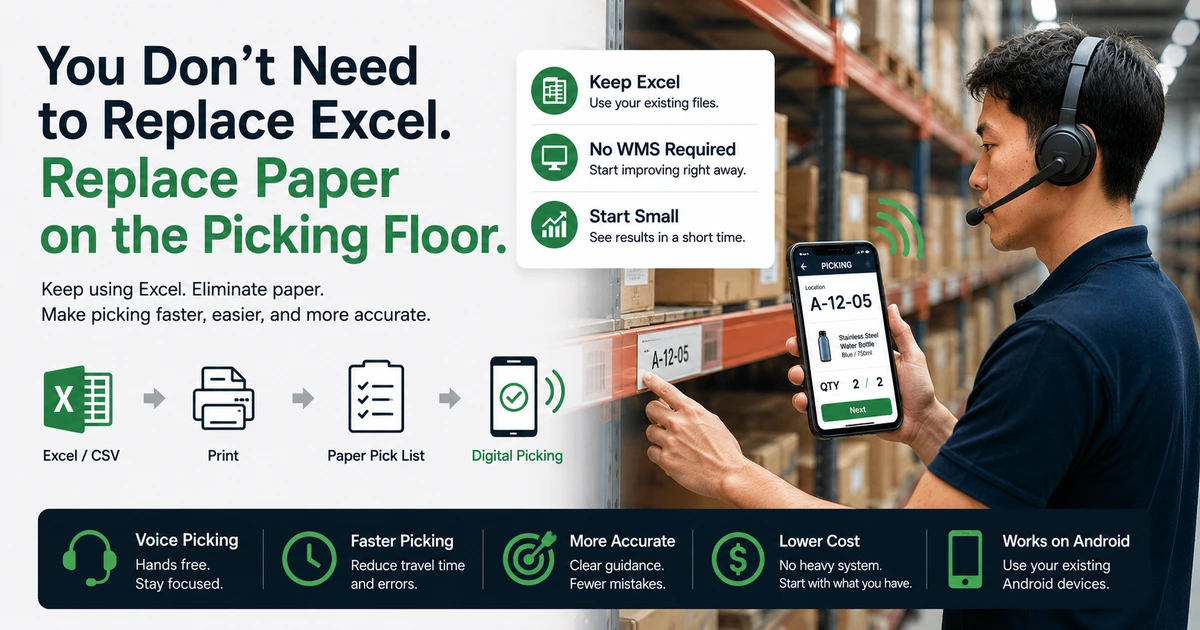
You Don't Need to Replace Excel. Replace Paper on the Picking Floor.
Manage orders in Excel.
Print a pick list.
Carry the paper onto the floor.
Read the product and quantity.
Pick the item.
Look down at the paper again for the next line.
Does that sound familiar?
For many small warehouses, e-commerce businesses, food distributors, retailers, wholesalers, and fulfillment teams, Excel or CSV files are still practical tools for managing orders.
And that is not necessarily a problem.
Improving a picking operation does not always mean replacing Excel with a completely new system.
The part worth reconsidering may not be Excel at all. It may be the workflow that turns Excel data into paper before anyone can start picking.
If your existing Excel or CSV files already contain the information your team needs, you may be able to keep them and change only what happens on the picking floor.
Instead of:
Excel → Print → Paper → Picking
you can move toward:
Excel → Smartphone → Digital or Voice Guidance → Picking
That is a much smaller change than replacing your entire operation.
Excel isn't necessarily the problem
When people talk about modernizing an Excel-based process, the first assumption is often:
"We need to replace Excel."
But for many picking operations, that is not the real issue.
Excel has several practical advantages:
- It is familiar to many teams.
- Order data is easy to organize and review.
- CSV import and export are widely supported.
- It is flexible enough for many small-business workflows.
- It does not require a major software implementation just to get started.
For a small or growing operation, Excel may already work perfectly well as the place where orders are prepared.
The friction often begins after that.
A typical workflow might look like this:
Manage orders in Excel
→ Print a pick list
→ Carry the list to the shelves
→ Read the product
→ Check the quantity
→ Pick the item
→ Find the next line on the paper
In other words, the improvement opportunity may not be the spreadsheet itself.
It may be how the information in that spreadsheet reaches the person doing the physical work.
The hidden cost of paper pick lists
Paper pick lists are popular for a good reason: they are simple.
Print the list, hand it to a picker, and work can begin.
There is almost no learning curve.
But when the same process is repeated dozens or hundreds of times every day, small inefficiencies can add up.
1. Every glance at the paper interrupts the flow
Before picking an item, the worker checks the list.
Before confirming the quantity, they may check it again.
After finishing the item, they look for the next line.
Each glance may take only a few seconds, but the pattern repeats throughout the shift.
The cost is not only time. It is also attention.
2. Paper can occupy a hand
A worker carrying a sheet of paper or clipboard may not have both hands fully available for handling products.
When an item is large, when several units must be picked, or when packing and sorting happen at the same time, the worker may need to:
put the list down → handle the products → pick the list up again → find the correct line
Those extra motions become part of the workflow.
3. Rows, quantities, and similar products can be misread
A dense pick list may contain product names, variants, units, and quantities on adjacent rows.
That creates opportunities to:
- read the wrong line
- pick the wrong quantity
- skip an item
- repeat an item
- lose track of the current position
The risk can increase when order volume is high or workers are under time pressure.
4. Order changes can lead to reprinting
If an order changes after a list has already been printed, the team may need to correct or reprint it.
When old and new copies exist at the same time, another question appears:
"Is this the latest version?"
5. Paperless picking is about more than paper cost
The price of a sheet of paper is usually not the main issue.
Paper workflows also involve printing, toner, printer maintenance, refilling paper, carrying documents, organizing them, and eventually disposing of them.
The real opportunity in going paperless is not simply using fewer sheets.
It is removing the extra work created by the paper-based process.
Going digital doesn't mean abandoning Excel
This is the key idea:
You do not have to rebuild your entire Excel workflow just to digitize picking.
If your orders are already organized in Excel or CSV, you can think about connecting that data directly to the picking process. Our guide on how to turn an Excel order list into a picking workflow walks through what that connection looks like in practice.
For example:
Excel / CSV
↓
Import to a smartphone
↓
Show or announce the product and quantity
↓
Picker handles the item
↓
Complete the task and continue
Excel can remain where your team prepares and manages order data.
The change happens on the floor:
the picker no longer needs a printed copy of that data before work can begin.
Compared with replacing an entire business system, this is a much smaller step.
From "look and pick" to "listen and pick"
Replacing a printed list with a smartphone screen can already reduce paper use.
But there is another question:
What happens if the picker still needs to look at the phone before every item?
The medium has changed from paper to a screen, but the worker is still repeatedly shifting visual attention between instructions, shelves, and products.
This is where voice picking becomes useful.
With voice-guided picking, the system can announce information such as the product name, variant, or quantity.
For example:
Product A, 10 units.
The worker hears the instruction, locates the item, picks the required quantity, completes the step, and moves to the next task.
Instead of repeatedly reading a list, the picker can keep more visual attention on the shelves and products while keeping both hands more available for physical work.
If you are new to this approach, see our guide on what voice picking is for an introduction to how voice-guided picking works and where it can be useful.
Do you need a WMS before you can improve picking?
Another common assumption is:
"If we want digital picking, don't we need a WMS?"
A warehouse management system can be extremely valuable when an operation needs comprehensive management of:
- inventory
- storage locations
- receiving
- shipping
- multiple warehouses
- users and workers
- replenishment
- cycle counting
- broader warehouse processes
But not every business that wants to improve picking needs to begin with a full WMS implementation.
Consider operations such as:
- a small warehouse managing orders in Excel
- an e-commerce seller preparing daily shipments
- a food or frozen-goods distributor
- a retailer preparing customer orders
- a wholesaler sorting outbound goods
- a small fulfillment team
Their immediate problem may not be:
"We need to manage every warehouse process in one platform."
It may simply be:
"We already have the order data in Excel. Can we pick faster without carrying paper around?"
If that is the problem, it can make sense to improve the picking step first.
Excel plus a smartphone can be a small, practical step
"Digital transformation" can sound expensive.
It can bring to mind consultants, servers, specialized hardware, long implementation projects, and major changes to existing systems.
But operational improvement can start much smaller.
A workflow that currently looks like:
Excel → Print → Paper pick list → Picking
can become:
Excel → Smartphone → Voice guidance → Picking
That is already a meaningful process change.
For businesses that cannot — or do not want to — replace existing order formats and internal processes immediately, this approach can be more practical:
keep what already works and digitize the part that creates the most friction.
Already managing orders in Excel? See how SortingGo brings your existing Excel or CSV order data onto the picking floor.
SortingGo: from Excel / CSV to voice-guided picking
SortingGo is an Android app designed to bring Excel and CSV order data into the actual picking workflow.
After importing existing order data, workers can use fields such as product name, specification, quantity, and other mapped information during picking.
With voice guidance, the workflow can become:
Import Excel / CSV
→ Start picking
→ Hear the product and quantity
→ Pick with both hands
→ Complete the step
→ Continue to the next item
For more details, see SortingGo Features.
SortingGo is not built around the idea that businesses must stop using Excel.
The goal is almost the opposite:
Make the Excel data you already have more useful on the picking floor.
You do not have to redesign every order-management process before trying voice-guided picking.
And you do not have to wait until you are ready for a full WMS before reducing your dependence on printed pick lists.
You can start with the data you already have.
Where can you start?
Going paperless does not have to mean eliminating every sheet of paper across the business at once.
A more practical approach is to choose one workflow and test it.
For example:
- the outbound pick list printed every morning
- e-commerce order picking
- food distribution sorting
- customer-by-customer order preparation
- retail order fulfillment
- small warehouse shipping
- wholesale order picking
You can even begin with:
one worker, one batch, or one type of order.
If your existing Excel workflow can remain in place, there are fewer things to change at the beginning.
That makes it easier to evaluate whether the new picking method actually helps the people doing the work.
Paperless is not the goal. A better workflow is.
"Going paperless" can easily become a goal by itself.
But the real objective on a picking floor should not be to achieve zero sheets of paper.
The objective is to help workers:
move naturally, reduce unnecessary checks, avoid mistakes, and complete work efficiently.
If paper is genuinely the simplest and most effective method for a particular process, there is no reason to remove it just to claim that the operation is digital.
But if your team is repeatedly:
- printing the same type of Excel order list
- carrying paper around the picking area
- switching attention between paper and products
- trying to remember which row they just completed
- reprinting lists after order changes
then that part of the workflow is worth examining.
To weigh the two side by side, see our full comparison of paper picking and digital picking.
Conclusion: keep Excel, remove the paper between the data and the picker
Excel has been part of everyday operations for a long time.
It is familiar.
It is flexible.
And in many businesses, existing workflows already depend on it.
So the first step toward better picking does not have to be replacing Excel.
A more useful question may be:
"Why are we printing this Excel file every day?"
If the printed sheet mainly exists to tell the picker what product to take and how many units to pick, there may now be a better way to deliver that information.
Keep Excel.
Keep the order data you already use.
Change the way that data reaches the picking floor.
You don't need to replace Excel. Replace paper on the picking floor.
Frequently asked questions
Can we digitize picking while continuing to manage orders in Excel?
Yes. Order data can remain in Excel or CSV while the picking process itself moves to a digital workflow. Digitizing the floor does not necessarily require replacing every existing system.
Do we need a WMS to eliminate paper pick lists?
Not necessarily. A WMS is valuable when you need comprehensive inventory, location, receiving, shipping, and warehouse management. If your immediate goal is to reduce paper pick lists and improve the picking process, you can also start with a smaller solution.
What is voice picking?
Voice picking is a picking method that provides work instructions — such as product names and quantities — through audio. It can reduce the need to repeatedly look at paper or a screen and allows workers to keep more attention on shelves and products.
Can SortingGo use Excel files?
SortingGo supports importing Excel and CSV data and mapping relevant fields into the picking workflow. Depending on the structure of your existing file, you may need to configure field mappings during import.
Is SortingGo only for large warehouses?
No. SortingGo is also designed for smaller operations that already manage orders in Excel or CSV and want a lower-barrier way to improve picking, including e-commerce, food distribution, group-order sorting, retail fulfillment, wholesale, and small warehouse operations.