
What Is Voice Picking? A Simple Guide for Small Warehouses and Order Fulfillment
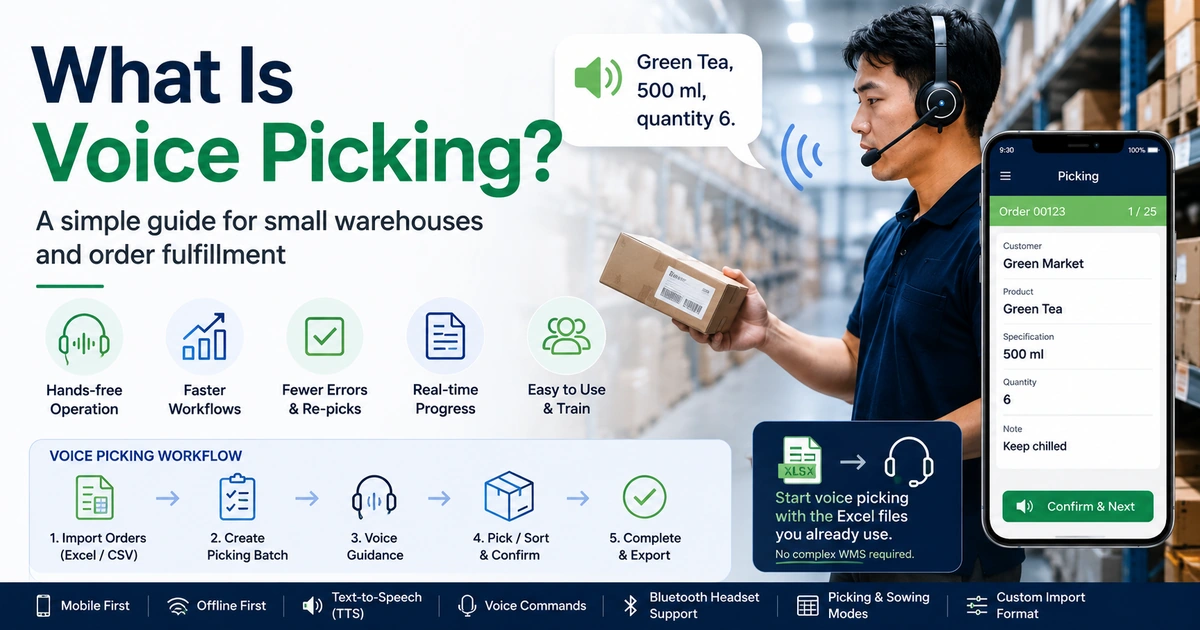
Picking orders sounds simple: read an order, find the item, pick the required quantity, confirm it, and move to the next one.
But when this process is repeated hundreds of times a day, small inefficiencies add up.
Workers may constantly look down at printed picking lists, check Excel sheets, hold a phone while handling products, or walk back to a workstation to confirm what comes next.
Voice picking offers another approach.
Instead of relying mainly on a screen or paper list, the worker receives spoken instructions such as:
"Green Tea, 500 ml, quantity 6."
The worker picks the items, confirms the task, and continues to the next instruction.
For large warehouses, voice picking is often associated with warehouse management systems, specialized headsets, and complex infrastructure.
But voice-guided workflows do not always have to start that way.
For smaller businesses already managing orders in Excel, a smartphone-based voice picking workflow can provide a simpler place to begin.
What is voice picking?
Voice picking is an order fulfillment method that uses spoken instructions to guide workers through picking, sorting, or distribution tasks.
Instead of repeatedly reading a paper picking list or checking a screen, the worker listens to instructions that tell them what to handle next.
A typical instruction may include:
- Product name
- Product specification
- Quantity
- Customer or destination
- Order notes
The basic workflow looks like this:
Order data → voice instruction → pick or sort → confirm → next item
The goal is simple:
Reduce the amount of time workers spend looking at screens or paper while performing physical work.
How does voice picking work?
A voice picking system needs order data and a way to convert the next task into spoken instructions.
A typical workflow has five steps.
1. Load the order data
The system first receives the orders that need to be processed.
Depending on the business, the source might be:
- A warehouse management system
- An ERP system
- An e-commerce platform
- A CSV file
- An Excel spreadsheet
For many small businesses, Excel is still the practical starting point.
2. Determine the picking sequence
The system determines which item or customer should be processed next.
For example:
Order 001
Customer: Green Market
Product: Apple Juice
Quantity: 6 bottles
3. Read the instruction aloud
The system converts the information into a spoken instruction.
For example:
"Green Market. Apple Juice. Quantity 6 bottles."
The worker can hear the instruction through the phone speaker or a compatible headset.
4. Complete and confirm the task
After picking or sorting the required quantity, the worker confirms completion.
Depending on the system, confirmation may be performed using:
- A touchscreen button
- A physical headset button
- A voice command
5. Continue automatically
After confirmation, the system moves to the next task and reads the next instruction.
The process becomes:
Listen → pick → confirm → listen → pick → confirm
This is what makes voice-guided picking useful for repetitive fulfillment work.
Voice picking vs. paper picking
Paper picking is still common, especially in small warehouses, wholesale businesses, food distribution operations, and small e-commerce teams.
It is easy to understand and requires almost no technology.
But paper also creates practical limitations.
| Paper picking | Voice-guided picking |
|---|---|
| Worker repeatedly reads a printed list | Worker listens to the next instruction |
| One hand may be used to hold paper | Hands can remain more available for handling goods |
| Progress may be marked manually | Progress can be recorded digitally |
| Changes may require reprinting | Digital data can be updated without printing another sheet |
| Completed work may need to be entered again | Completion can be recorded during the workflow |
| Paper lists can be misplaced or damaged | Work data remains in the application |
This does not mean every paper workflow should immediately be replaced.
For a very small number of orders, paper may still be perfectly adequate.
The value of digital or voice-guided picking becomes more noticeable as order volume, product variety, and repetitive handling increase.
If your order data already lives in a spreadsheet, our guide on removing paper from the picking floor without replacing Excel covers how that transition can start.
What are the benefits of voice picking?
1. Less screen checking
A worker does not need to look at a phone or computer for every instruction.
The next product, customer, or quantity can be spoken automatically.
This is especially useful when the worker is moving between shelves, boxes, baskets, refrigerators, or preparation tables.
2. More hands available for the actual work
Picking and sorting are physical tasks.
Workers may need both hands to:
- Carry products
- Open cartons
- Move baskets
- Count items
- Pack orders
- Handle food containers
- Attach labels
Reducing the need to constantly hold a paper list or phone can make the workflow more natural.
3. Less dependence on printed picking lists
If the order data already exists digitally, printing it just to carry it around the workplace introduces another step.
A digital workflow can use the existing order data directly.
4. Clearer step-by-step instructions
Voice guidance presents one task at a time.
Instead of scanning a large spreadsheet and deciding which row comes next, the worker can focus on the current instruction.
5. Easier progress tracking
A digital picking workflow can record which tasks are pending, in progress, or completed.
If the work is interrupted, the operator can return to the workflow instead of trying to remember where they stopped on a paper sheet.
Do you need a WMS for voice picking?
Not necessarily.
A warehouse management system (WMS) can be extremely valuable for warehouses that need capabilities such as:
- Real-time inventory management
- Location management
- Barcode tracking
- Multiple warehouse coordination
- Worker assignment
- Advanced replenishment
- ERP integration
- Detailed warehouse analytics
For complex operations, a WMS may be the appropriate solution.
But not every business is operating at that level.
Many smaller operations still use workflows such as:
Orders
↓
Excel
↓
Print
↓
Pick / Sort
↓
Manually confirm completion
For these businesses, the first improvement does not necessarily have to be a complete warehouse management system.
A lighter workflow can look like:
Orders
↓
Excel
↓
Mobile picking app
↓
Voice guidance
↓
Pick / Sort
↓
Digital completion
This allows a business to improve the picking process while continuing to use the Excel files it already understands.
Traditional voice picking vs. smartphone voice picking
Traditional enterprise voice picking systems are usually designed as part of a larger warehouse infrastructure.
They may integrate with:
- WMS platforms
- Warehouse servers
- Dedicated wearable terminals
- Industrial headsets
- Barcode systems
- Enterprise wireless infrastructure
This approach can make sense for large distribution centers.
Smaller businesses, however, may have a different starting point.
They may already have:
- An Android phone
- Excel order files
- A Bluetooth headset
- A small warehouse or stockroom
- A few workers handling fulfillment
In that environment, a smartphone can become the bridge between the order file and the physical picking process.
The objective is not to reproduce every feature of an enterprise WMS.
It is to solve a smaller and more immediate problem:
How can we turn the order data we already have into a clearer, faster picking workflow?
How to start voice picking from Excel
If your business already manages orders in Excel, you may not need to rebuild your entire order management process.
A simple workflow can begin with the spreadsheet you already use.
Step 1: Prepare your order data
A basic order file may contain fields such as:
| Customer | Product | Quantity | Specification | Note |
|---|---|---|---|---|
| Green Market | Apple Juice | 6 | 500 ml | Keep chilled |
| Sunrise Cafe | Milk | 12 | 1 L | Deliver before noon |
| ABC Store | Bread | 8 | Whole wheat | — |
Step 2: Import the file
Import the Excel or CSV file into a picking application.
If your spreadsheet uses custom column names, a field-mapping process can connect your existing columns to the fields required by the picking workflow.
Step 3: Choose the work method
Different businesses may organize work differently.
Two common approaches are:
Picking by customer
Process one customer at a time and collect all products for that order.
Customer A
├── Product 1
├── Product 2
└── Product 3

Customer B
├── Product 1
└── Product 4
Or:
Putting by product
Take one product and distribute the required quantities across multiple customers.
Product 1
├── Customer A
├── Customer B
└── Customer C

Product 2
├── Customer A
└── Customer D
The right method depends on the physical layout and type of operation.
Step 4: Enable voice guidance
Instead of reading each row manually, the application speaks the current task.
For example:
"Sunrise Cafe. Milk. One liter. Quantity 12."
The worker completes the task and confirms it.
Step 5: Continue to the next item
After confirmation, the application automatically presents and reads the next task.
This converts the spreadsheet from a passive document into an active workflow.
Already have your orders in Excel? See how SortingGo turns existing order data into a voice-guided picking batch.
Example: voice picking with SortingGo
SortingGo is one example of a lightweight approach designed around this workflow.
Instead of requiring a business to create a complete warehouse database first, SortingGo can work with order data imported from Excel or CSV files.
The general process is:
Excel / CSV
     ↓
Import orders
     ↓
Create a sorting batch
     ↓
Choose picking or putting
     ↓
Voice guidance
     ↓
Complete each task
     ↓
Export results
During a sorting or picking operation, SortingGo can automatically read information such as:
- Customer
- Product
- Specification
- Quantity
- Order notes
The operator can complete a task and continue to the next one without repeatedly searching through spreadsheet rows.
SortingGo also supports workflows such as custom Excel field mapping, picking and putting modes, work progress recovery, routing sequences, and voice-based operation depending on the selected plan.
For more details, see SortingGo Features.
The idea is not to replace every WMS function.
It is to provide a practical bridge between:
"We manage orders in Excel"
and
"We want a structured digital picking workflow."
Where can voice picking be useful?
Voice-guided workflows are not limited to large warehouses.
They can also be useful in smaller operations where workers repeatedly move products according to order data.
Small warehouses
Workers can receive the next item and quantity while moving through storage shelves.
E-commerce fulfillment
Online orders can be organized into picking batches instead of being processed directly from printed order sheets.
Wholesale distribution
Workers handling many customer orders can use voice instructions to reduce repeated checking of customer and product information.
Group buying and community orders
One product may need to be distributed among many customers.
A voice-guided sorting workflow can tell the operator which customer receives which quantity.
Food distribution
When workers are handling refrigerated, frozen, fresh, or packaged foods, keeping their hands available for the physical task can be particularly useful.
Restaurant preparation and distribution
Central kitchens, restaurants, and food preparation teams can use order data to guide the allocation of ingredients, meal boxes, or prepared items.
When is voice picking probably not necessary?
Voice picking is not automatically better for every business.
If you process only a handful of simple orders each day, a paper list may already be sufficient.
A voice-guided workflow becomes more worth considering when you notice problems such as:
- Workers repeatedly looking between products and paper
- Too many printed picking sheets
- Frequent missed or skipped order lines
- Difficulty remembering where work stopped
- Repetitive checking of product names and quantities
- Workers needing both hands while handling products
- Excel already contains the order data, but the physical workflow is still manual
These are signs that the problem may not be the order data itself.
The missing piece may be the connection between the digital order and the physical work.
Voice picking is a workflow, not just a voice
Adding text-to-speech to an order list does not automatically create an effective voice picking process.
A useful workflow also needs to answer:
- What should the worker do next?
- In what sequence should orders be processed?
- How does the worker confirm completion?
- What happens if the quantity changes?
- Can the worker go back to the previous task?
- Can an instruction be repeated?
- Is progress saved if work is interrupted?
The voice is only the interface.
The real value comes from connecting:
Order data + work sequence + voice guidance + confirmation + progress tracking
That is what turns an Excel order list into an operational picking workflow.
Voice guidance sits at one end of that spectrum. For the wider view, see how paper picking and digital picking compare across cost, accuracy and scale.
Start with the workflow you already have
Moving from paper picking to digital picking does not have to begin with a large software project.
If your business already manages orders in Excel, that file can be the starting point.
A practical progression might be:
Excel + paper
      ↓
Excel + mobile picking
      ↓
Excel + voice-guided picking
      ↓
More structured fulfillment
      ↓
WMS / ERP integration when needed
The important point is that digital transformation does not have to happen all at once.
You can start by improving the part of the workflow that causes the most repetitive work.
For many small fulfillment teams, that part is picking and sorting.
If your orders are currently stored in Excel, our earlier guide on how to turn an Excel order list into a picking workflow explains how to move from a spreadsheet-based order list toward a structured picking process without immediately adopting a full warehouse management system.