
Paper Picking vs Digital Picking: Which Is Better for Small Warehouses?
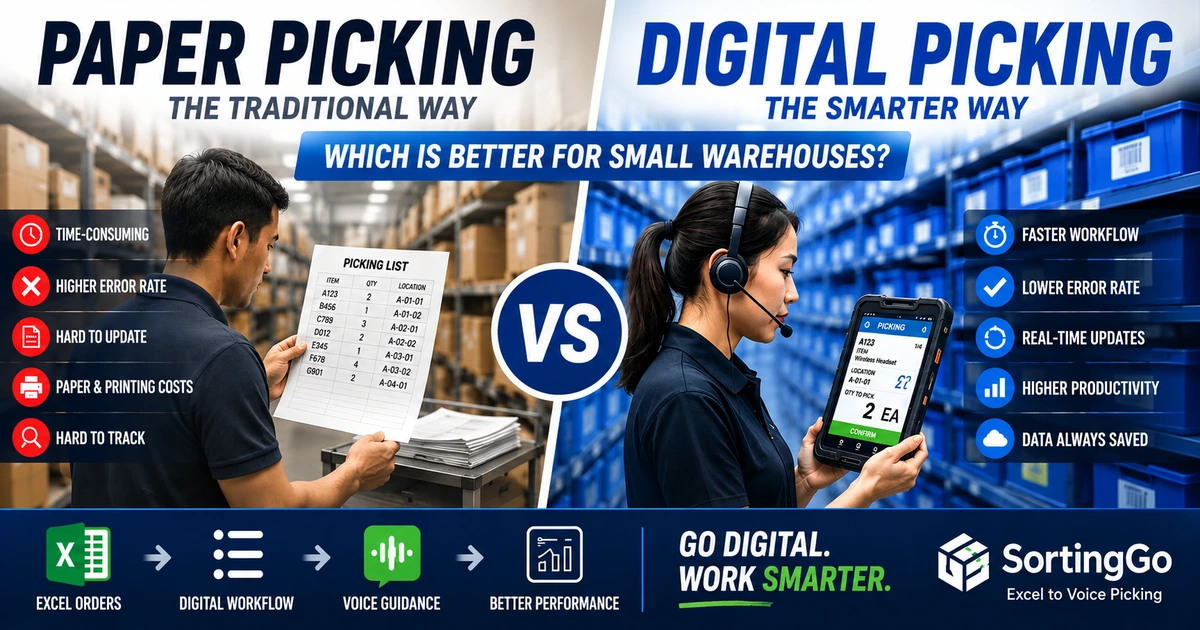
For many small warehouses, e-commerce sellers, food distributors, and growing fulfillment teams, paper is still part of the daily picking process.
An order is received in Excel. Someone prints a picking list. A worker walks through the storage area, checks each line, picks the required quantity, marks the paper, and brings the completed order to the packing area.
It is simple, familiar, and inexpensive to start.
So why change it?
The answer is not that paper picking is always bad. For a very small operation with a limited number of orders, paper can work perfectly well. The problem appears when order volume grows, product variety increases, more workers join the process, or frequent changes make printed lists difficult to keep current.
At that point, the real question is no longer:
"Does paper work?"
It becomes:
"Is paper still the most efficient way to run the picking floor?"
This article compares paper picking and digital picking from the perspective of small and medium-sized operations, including cost, accuracy, speed, training, flexibility, traceability, and scalability.
What is paper picking?
Paper picking is one of the simplest warehouse picking methods.
A picking list is printed from an order management system, spreadsheet, ERP, or other source. The worker carries the list through the warehouse and uses it as the main guide for locating and picking products.
A typical workflow looks like this:
- Orders are entered or collected in Excel or another system.
- A picking list is created.
- The list is printed.
- The picker reads the product, quantity, and location from the paper.
- The picker finds and picks the item.
- The picker checks, crosses out, or marks the completed line.
- The completed paper is returned for packing, verification, or manual record updates.
The biggest advantage is obvious: almost everyone already knows how to use paper.
There is little technical setup, no special device is required, and workers can often begin immediately.
What is digital picking?
Digital picking replaces the printed picking list with a digital workflow.
Instead of carrying a sheet of paper, the picker follows instructions on a smartphone, tablet, handheld device, wearable device, or another digital interface.
Depending on the system, a digital picking workflow may include:
- Order import
- Batch creation
- Product and quantity instructions
- Picking sequence
- Barcode or QR code scanning
- Voice guidance
- Completion tracking
- Exception handling
- Digital records
- Exported results
- Label printing
Digital picking does not necessarily mean implementing a full warehouse management system (WMS).
For smaller operations, the change can be much simpler.
For example, a business may continue using Excel as its order data source while replacing only the printed picking list with a mobile picking workflow.
That distinction matters.
Digital transformation does not always require replacing every system at once.
Paper picking vs digital picking: quick comparison
| Area | Paper picking | Digital picking |
|---|---|---|
| Initial setup | Very low | Low to high depending on the solution |
| Hardware | Paper and printer | Smartphone, tablet, handheld, or wearable |
| Learning curve | Very low | Usually requires some onboarding |
| Order changes | Requires reprinting or manual correction | Can be updated digitally |
| Picking guidance | Visual reading | Screen, scan, audio, or voice guidance |
| Completion tracking | Manual marks | Digital status |
| Record keeping | Paper storage or manual entry | Digital records |
| Error prevention | Relies heavily on worker attention | Can provide prompts and validation |
| Hands-free potential | Limited | Possible with voice or wearable workflows |
| Scaling | More paper and coordination | Easier to standardize as volume grows |
| Printing cost | Recurring | Can reduce or eliminate picking-list printing |
| Process data | Limited unless manually entered | Easier to collect and review |
The right choice depends on the size and complexity of the operation.
A warehouse processing ten simple orders per day has very different needs from one processing hundreds of order lines across many products.
1. Startup cost
Paper picking
Paper is difficult to beat when judged only by initial setup cost.
If a business already has:
- Excel,
- a computer,
- a printer,
- and paper,
it can create a basic picking process with almost no additional investment.
This is one reason paper remains common in small operations.
However, the initial cost does not show the entire picture.
Recurring costs can include:
- paper,
- toner or ink,
- printer maintenance,
- reprints,
- time spent preparing lists,
- manual corrections,
- and administrative work after picking.
Each individual cost may seem small, but the total can increase as order volume grows.
Digital picking
Digital picking usually requires some initial setup.
This may involve configuring an app, importing order data, mapping spreadsheet columns, training workers, or preparing devices.
But small businesses may already own the hardware they need.
A smartphone-based workflow, for example, can significantly reduce the entry barrier compared with traditional warehouse systems that require dedicated terminals or a large infrastructure project.
Winner for very small operations: paper. For extremely low-volume workflows, paper remains difficult to beat on simplicity and initial cost.
Advantage as volume grows: digital. As repetitive printing and manual administration increase, the economics begin to change.
2. Picking accuracy
Picking errors are expensive because the cost is rarely limited to the item itself.
A wrong pick can lead to:
- repacking,
- customer complaints,
- additional delivery costs,
- returns,
- inventory discrepancies,
- and time spent investigating what happened.
Paper picking
With paper, the worker typically needs to repeatedly switch attention between:
- the printed list,
- the shelf,
- the product,
- the quantity,
- and the container or order being prepared.
The process depends heavily on visual attention and manual checking.
Workers may accidentally:
- skip a line,
- read the wrong row,
- pick the wrong quantity,
- mark an unfinished line as complete,
- or lose track of their position after an interruption.
This does not mean paper automatically causes errors. Experienced workers can be extremely accurate.
The limitation is that the paper itself provides very little active assistance.
Digital picking
Digital workflows can guide the worker one task at a time.
Depending on the solution, the system can:
- show one picking instruction at a time,
- require confirmation,
- provide audio instructions,
- support barcode validation,
- track completed lines,
- or prevent workers from accidentally skipping required steps.
Digitalization does not eliminate human error, but it creates more opportunities to design error prevention directly into the workflow.
Advantage: digital. The benefit becomes more significant as order complexity increases.
3. Picking speed
Speed is not simply about walking faster.
A large part of picking efficiency comes from reducing unnecessary actions.
Paper picking
Paper workflows can be fast when:
- the warehouse is small,
- the picker knows every product location,
- order volume is low,
- and picking lists are well organized.
But workers may lose time by:
- searching long lists,
- finding their previous position,
- reading small text,
- checking handwritten marks,
- returning to skipped items,
- or following an inefficient item sequence.
Digital picking
A digital workflow can reduce some of these actions.
For example, instructions can be displayed sequentially, products can be sorted according to a predefined route, and completed tasks can automatically move to the next instruction.
Voice-guided workflows can go one step further.
Instead of repeatedly looking down at a sheet or screen, the worker can receive product and quantity information through audio while keeping more attention on the physical picking task.
Advantage: depends on workflow. Digital tools create more opportunities for optimization, but simply replacing paper with a screen does not automatically make picking faster. The workflow design matters.
4. Worker training
Paper picking
Paper has an important advantage: familiarity.
A new worker can understand a printed list quickly.
However, understanding the list is not the same as understanding the warehouse.
New workers still need to learn:
- product locations,
- abbreviations,
- picking sequences,
- special handling rules,
- and local operating habits.
In many paper-based operations, a significant amount of process knowledge exists only in the minds of experienced employees.
Digital picking
A well-designed digital workflow can make instructions more explicit and consistent.
Instead of telling a new employee:
"Follow this list, but normally we pick these shelves first, and remember that this product name means that item over there."
the workflow can present the tasks in the intended sequence.
Voice guidance can also reduce the need to continuously interpret dense picking lists.
Advantage: digital for repeatable processes. Paper is easier to understand immediately, but digital workflows can make standardized training easier as the team grows.
5. Handling order changes
Orders change.
Customers add products. Quantities are corrected. Items become unavailable. Priority orders appear after the picking list has already been printed.
This is where static paper begins to show its limitations.
Paper picking
Once a list is printed, it represents a snapshot in time.
A change may require:
- printing a new version,
- writing a correction by hand,
- notifying the picker separately,
- or remembering which version is current.
When multiple copies exist, version confusion becomes possible.
Digital picking
Digital data is easier to revise without generating another physical document.
The exact capabilities depend on the software and workflow, but digital processes are generally better suited to environments where information changes frequently.
Advantage: digital. The more frequently orders change, the more valuable this becomes.
6. Traceability and record keeping
Paper picking
Paper creates a physical record, but using that record later can be inconvenient.
Questions such as:
- Was this line completed?
- Which batch did this order belong to?
- What was actually picked?
- Was a quantity changed?
- Where is yesterday's picking sheet?
may require searching through paper or manually transferring information into another system.
Digital picking
Digital completion records are easier to store, export, search, and analyze.
Even a lightweight workflow can make it easier to keep completed picking information together with the original order data.
This becomes increasingly useful when the business wants to review operations or identify recurring problems.
Advantage: digital. Especially when historical records matter.
7. Paper consumption and printing
Paper picking requires a physical list for each workflow.
Depending on the operation, businesses may print:
- individual orders,
- batch picking sheets,
- packing lists,
- preparation sheets,
- and corrected versions.
A single sheet is inexpensive.
Thousands of sheets are not.
The larger cost, however, may be the process surrounding the paper:
- preparing it,
- sorting it,
- distributing it,
- collecting it,
- correcting it,
- and storing or discarding it.
Digital picking can reduce or eliminate the need to print internal picking instructions.
This does not mean every warehouse must become completely paperless. Shipping documents, regulatory paperwork, or customer-facing documents may still require printing.
The goal is to ask a more practical question:
Which internal documents still need to exist on paper?
For many businesses, the picking list is a good place to start.
Advantage: digital. Particularly for repetitive internal documents.
8. Hands-free operation
This is one of the biggest differences between traditional paper picking and more advanced digital workflows.
Paper picking
A paper list must be:
- carried,
- placed somewhere,
- held,
- folded,
- clipped to a board,
- or repeatedly picked up and put down.
Even when the worker does not literally hold the sheet throughout the process, visual attention still needs to return to it.
Screen-based digital picking
A smartphone or handheld device removes the paper, but it can create a similar problem if the worker must constantly hold and read the screen.
This is why digital picking and hands-free picking are not necessarily the same thing.
Voice-guided digital picking
Voice guidance changes the interaction model.
Instead of making the worker continuously read instructions, the system can speak information such as:
- product name,
- specification,
- quantity,
- and unit.
The worker can then interact with the workflow using supported controls or voice commands, depending on the solution.
This allows digitalization to address not only paper consumption but also the way workers receive information during physical work.
Advantage: voice-enabled digital picking. Especially for tasks where workers frequently need both hands to handle products or containers.
9. Scalability
A workflow that works for one person may become difficult with five people.
A process that works for 20 orders may become difficult with 200.
Paper picking
Scaling a paper process often means increasing:
- the number of printed lists,
- coordination between workers,
- manual sorting,
- version control,
- and post-picking administration.
The process can still work, but complexity tends to grow with volume.
Digital picking
Digital workflows make it easier to standardize how tasks are presented and completed.
They also provide a foundation for future improvements such as:
- batch workflows,
- route optimization,
- barcode validation,
- voice guidance,
- labels,
- and integration with other systems.
Advantage: digital. Especially when the business expects order volume or team size to grow.
When does paper picking still make sense?
Paper is not obsolete.
It may still be the most practical choice when:
- order volume is very low,
- there are only a few products,
- one experienced person handles most picking,
- orders rarely change,
- picking errors are uncommon,
- there is little need for historical process data,
- and the cost of changing the workflow would exceed the likely benefit.
For a micro-business processing a handful of simple orders, introducing technology simply for the sake of "digital transformation" may create unnecessary complexity.
The objective should not be to eliminate paper at any cost.
The objective should be to remove bottlenecks.
When should you consider digital picking?
It may be time to evaluate a digital workflow when several of the following become familiar:
- Picking lists are printed every day.
- Workers frequently need to reprint corrected orders.
- People lose their place on long picking sheets.
- New workers take a long time to learn the process.
- Picking mistakes are becoming expensive.
- Multiple workers need a consistent workflow.
- Order volume is increasing.
- The number of SKUs is increasing.
- Completed paper lists must later be entered into another system.
- Workers need both hands for picking.
- You want to introduce voice guidance, scanning, routing, or digital completion records.
- You want to improve picking without immediately implementing a full WMS.
The last point is particularly important for small businesses.
The choice is not limited to:
Paper
or
a large WMS project.
There is a large middle ground.
Still printing a picking list every morning? See how SortingGo turns the Excel or CSV order data you already have into a mobile picking workflow.
You may not need to replace Excel
Many small businesses already have an order process built around Excel.
That spreadsheet may contain:
- customer names,
- order numbers,
- product names,
- specifications,
- quantities,
- units,
- and other business-specific fields.
Replacing Excel may not be the highest-priority problem.
The real bottleneck may begin only after someone presses Print.
A practical digitalization strategy can therefore look like this:
Excel order data → digital import → picking batch → mobile guidance → completion record
The practical steps for that first arrow are covered in our guide on how to turn an Excel order list into a picking workflow.
This allows a business to improve the warehouse floor without redesigning its entire back-office process at the same time.
If this approach sounds familiar, read You Don't Need to Replace Excel. Replace Paper on the Picking Floor.
That is the key idea behind moving from that article to this comparison: keep the parts of the current workflow that still work, and improve the parts that create unnecessary friction.
From digital picking to voice picking
Replacing paper with a screen is only the first step.
For physical warehouse work, the next question is:
How should the worker receive the picking instruction?
If every digital instruction still requires the worker to stop, look down, read the screen, and then resume picking, some of the original friction remains.
Voice picking offers another interface.
The worker listens to the instruction instead of relying entirely on visual reading.
A lightweight voice-guided workflow can be especially useful for:
- small warehouses,
- e-commerce fulfillment,
- group-buying operations,
- food distribution,
- order preparation,
- and other environments where workers frequently handle products with both hands.
For a deeper introduction, see What Is Voice Picking? A Practical Guide for Small Warehouses.
A lightweight example: SortingGo
SortingGo is designed around a simple idea:
Keep the order data you already have, but make the picking floor easier to operate.
Instead of requiring a business to replace its entire workflow with a traditional WMS, SortingGo can use Excel or CSV order data as the starting point for a mobile picking workflow.
Depending on the workflow and plan, SortingGo supports capabilities such as:
- Excel/CSV order import
- Field mapping
- Order and batch workflows
- Picking and sorting modes
- Preparation views
- Product and customer sequencing
- Voice guidance
- Voice or media-button controls
- Digital completion tracking
- Excel export
- Label-printing integration with SortingGo Print Service
A full breakdown is available on the SortingGo voice-guided picking features page.
The purpose is not to turn every small warehouse into a complex enterprise IT project.
It is to make the transition from:
printed instructions
to:
digital instructions
and, when useful:
voice-guided instructions
more accessible.
Paper vs digital picking: which should you choose?
There is no universal answer.
Choose paper picking if your operation is small, stable, simple, and already works efficiently.
Consider digital picking when paper begins creating repetitive work, visibility problems, errors, training difficulties, or limitations as order volume grows.
And if your current process is based on Excel, do not assume digitalization means replacing everything.
A more practical progression may be:
Excel + paper
↓
Excel + digital picking
↓
Excel + voice-guided picking
↓
More advanced warehouse systems when the business actually needs them
That progression allows small businesses to improve operations one step at a time.
Frequently asked questions
Is digital picking the same as a WMS?
No. A WMS is a broader warehouse management platform that may cover inventory, receiving, replenishment, locations, picking, shipping, traceability, integrations, and other warehouse functions.
Digital picking can be one part of a WMS, but it can also be implemented as a lighter workflow without deploying a complete WMS.
Is paper picking always slower than digital picking?
No. A simple paper workflow can be extremely efficient in a small, familiar environment.
Digital picking becomes more valuable when order complexity, volume, worker count, error-prevention requirements, or process coordination increase.
Can a small warehouse use digital picking without special hardware?
Yes, depending on the software. Smartphone-based picking can provide a lower-cost entry point because businesses may not need dedicated warehouse terminals for every workflow.
Do I need to stop using Excel before moving to digital picking?
Not necessarily.
If Excel already works well as your order data source, you can focus first on digitalizing the picking-floor workflow.
What is the difference between digital picking and voice picking?
Digital picking is a broad category in which picking instructions and completion information are handled digitally.
Voice picking is a type of digital picking in which audio or voice becomes an important part of how workers receive instructions or interact with the workflow.
Does going digital eliminate picking errors?
No system can guarantee zero errors.
Digital workflows can, however, introduce structured instructions, confirmations, scanning, voice guidance, and other mechanisms that help reduce common process mistakes.
When should a business consider a full WMS?
A full WMS becomes more relevant when the business requires capabilities such as complex inventory control, multiple warehouse locations, replenishment logic, advanced traceability, extensive integrations, or coordinated warehouse operations beyond the picking workflow.
For businesses that mainly need to improve an Excel-and-paper picking process, a lighter digital workflow may be a more practical first step.
Final thoughts
Paper picking has survived for a reason.
It is simple, flexible, familiar, and inexpensive to start.
But simplicity at the beginning can become friction as a business grows.
Digital picking offers a way to reduce repetitive printing, improve workflow consistency, create digital completion records, and introduce technologies such as routing, scanning, and voice guidance.
The most important decision is not whether paper is "old" or digital is "modern."
It is whether the current process still fits the operation.
If Excel continues to work well for managing order data, keep it.
If paper is becoming the bottleneck on the warehouse floor, improve that part first.
Digital transformation does not have to begin with replacing everything. Sometimes it begins by replacing one printed picking list.
SortingGo is a voice-guided picking and sorting app for practical, lightweight warehouse and order-fulfillment workflows. It helps businesses turn Excel or CSV order data into mobile picking tasks without requiring a complete warehouse-system replacement.