
How to Reduce Picking Errors in Excel Workflows
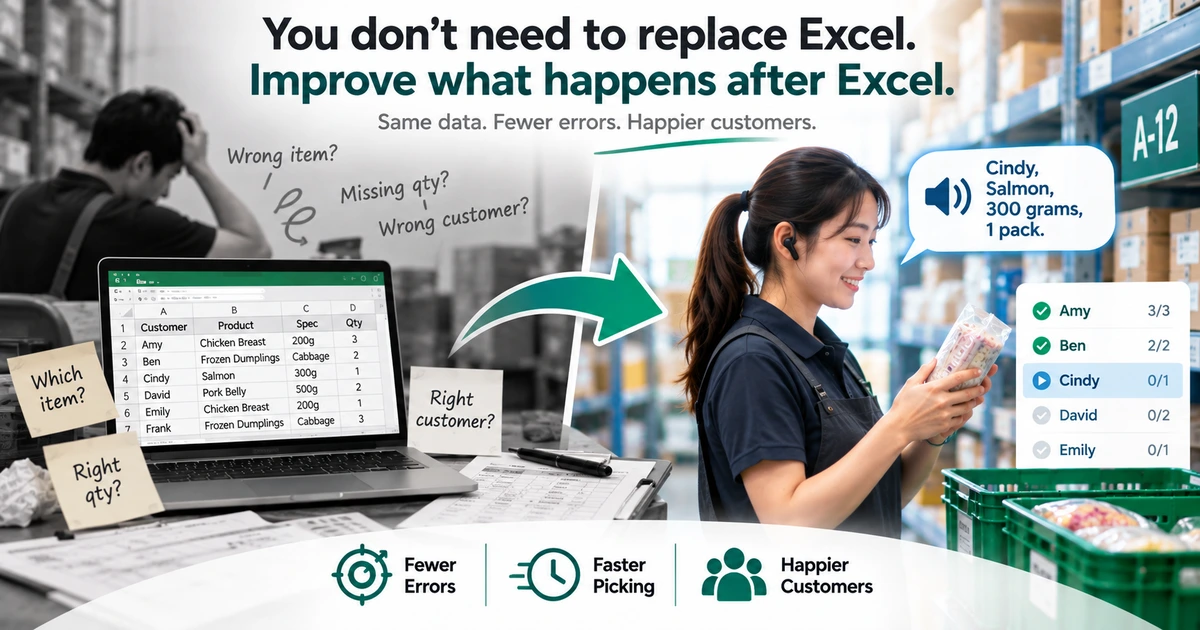
Many small warehouses, group-buying businesses, food distributors, and e-commerce sellers use Excel to manage orders.
And for good reason.
Excel is easy to access, easy to edit, and flexible enough to organize customers, products, quantities, and order data. For many businesses that are not yet ready for a full Warehouse Management System (WMS), Excel may already be sufficient for day-to-day order management.
But the problem often does not begin inside Excel.
The real risk appears when:
Order data leaves the spreadsheet and enters the actual picking operation.
Workers may need to look at Excel, find a product, remember the customer, remember the quantity, pick the item, and then return to the spreadsheet to locate the next row.
As order volume grows and the number of products increases, this seemingly simple workflow can lead to missed items, wrong quantities, incorrect products, or items being placed into the wrong customer order.
This article looks at where common Excel picking errors come from and how you can reduce them without necessarily replacing Excel.
Why Do Excel Picking Workflows Produce Errors?
Imagine your Excel order data looks like this:
| Customer | Product | Specification | Quantity |
|---|---|---|---|
| Amy | Frozen Dumplings | Cabbage | 2 |
| Amy | Chicken Breast | 200g | 3 |
| Ben | Frozen Dumplings | Cabbage | 1 |
| Ben | Salmon | 300g | 2 |
| Cindy | Chicken Breast | 200g | 1 |
From a data perspective, there is nothing wrong with this spreadsheet.
But on the picking floor, a worker may need to:
- Find the next row in Excel
- Remember the customer
- Remember the product
- Remember the specification
- Remember the quantity
- Look away from the screen and find the product
- Pick the correct quantity
- Return to Excel and locate the next row
This is where errors begin to appear.
Excel stores the data, but people still have to execute the picking process.
Whenever workers repeatedly switch between reading, remembering, searching, picking, and confirming information, there are more opportunities for mistakes.
Common Error #1: Reading the Wrong Excel Row
When a spreadsheet contains dozens, hundreds, or even thousands of rows, one of the simplest mistakes is losing track of the current row.
For example:
Amy    Chicken Breast     200g       3
Ben    Frozen Dumplings   Cabbage    1
Ben    Salmon             300g       2
Cindy  Chicken Breast     200g       1
After completing one item, a worker may look away from the screen to retrieve the product. When they return, they may no longer remember which row they were working on.
This becomes especially difficult when neighboring rows contain similar customer names or products.
Possible errors include:
- Skipping a row
- Processing the same row twice
- Reading the wrong customer
- Reading the wrong quantity
- Continuing from the wrong position
Improvement: Make the Current Task Obvious
Workers should not have to repeatedly search through an entire spreadsheet to determine where they left off.
A better picking workflow clearly identifies:
What needs to be processed right now.
Once that task is completed, the workflow moves to the next one.
This reduces the need to repeatedly locate the correct Excel row.
Common Error #2: Remembering the Wrong Quantity
Quantity errors are another common problem.
Suppose Excel shows:
Chicken Breast, 200g × 3
A worker reads the row and walks to the shelf.
On the way, they may be interrupted or distracted. By the time they reach the product, they remember:
Chicken Breast... was it 2?
Now they either need to return to the screen or rely on memory.
The issue is not necessarily that the worker is careless.
The workflow itself may be asking the worker to remember too much information at once.
Improvement: Reduce Short-Term Memory Load
A picking workflow should minimize the amount of information workers need to hold in memory, including:
- Customer
- Product
- Specification
- Quantity
- Unit
If the information can be quickly repeated or confirmed when needed, workers do not have to rely entirely on memory.
For example, voice guidance might say:
"Amy. Chicken Breast, 200g. Quantity is 3 packs."
The worker can hear the current task without repeatedly searching through spreadsheet cells.
Common Error #3: Picking a Similar-Looking Product
Similar product names are another frequent source of picking errors.
For example:
- Original Chicken Breast
- Black Pepper Chicken Breast
- Herb Chicken Breast
Or:
- Dumplings, 20 pieces
- Dumplings, 30 pieces
- Dumplings, 50 pieces
Even when the Excel data is completely correct, the final order will still be wrong if the worker selects the wrong product from the shelf.
Improvement: Make Products Easier to Identify
In addition to the full product name, useful identification information may include:
- Specification
- Unit
- Product nickname or short name
- Storage location
- Label
- Barcode
The goal is not simply to display more information.
The goal is to help workers answer one question faster:
"Am I picking the correct product?"
The easier the product is to identify, the lower the risk of confusing similar items.
Common Error #4: Picking the Right Product for the Wrong Customer
Not every picking error involves selecting the wrong product.
Sometimes the product and quantity are correct, but the item ends up in the wrong customer order.
This can happen frequently in group buying, food distribution, or any workflow where multiple customer orders are processed at the same time.
Imagine several containers on a worktable:
Amy
Ben
Cindy
David
Emily
A worker may have the correct item in hand, but placing it into the wrong container still creates an incorrect order.
Improvement: Establish a Clear Customer Sequence
When multiple customers are processed together, assigning a fixed and visible sequence can make the workflow easier to follow.
For example:
01 Amy
02 Ben
03 Cindy
04 David
05 Emily
Workers can then follow a consistent order rather than repeatedly searching for the correct customer.
For operations with many repetitive orders, sequence itself becomes an important error-reduction tool.
Common Error #5: Printed Lists and Excel Become Out of Sync
Some operations print a picking list from Excel and use the paper copy on the picking floor.
This solves one problem — you no longer need to carry a computer around — but it introduces another:
A printed picking list is a snapshot of the data at a specific moment.
If an order changes after printing, for example:
- A customer adds an item
- A quantity changes
- A product is canceled
- A specification changes
Excel may contain the latest information while the printed picking list still contains the previous version.
The result can be a situation where:
Excel is correct, and the printed list was correct when it was printed — but they no longer represent the same version of the order.
If you are weighing up how much this actually costs you, the side-by-side in paper picking versus digital picking goes through it in more detail.
Improvement: Reduce Unnecessary Data Transitions
Every additional manual transition creates another opportunity for information to become outdated or incorrect.
For example:
Orders
↓
Excel
↓
Manual formatting
↓
Printed picking list
↓
Handwritten updates
↓
Manual data entry
If the workflow can be shortened to:
Orders
↓
Excel
↓
Digital Picking
there are fewer versions of the same information to maintain.
Removing the print step without removing Excel is the subject of You Do Not Need to Abandon Excel. Just Remove Paper From the Picking Area.
You Do Not Necessarily Need to Replace Excel
At this point, it may be tempting to conclude:
"So we should replace Excel?"
Not necessarily.
For many small businesses, Excel remains a practical and effective order management tool.
The more useful question may not be:
"Should we stop using Excel?"
Instead, ask:
"How should the data in Excel be delivered to workers on the picking floor?"
Excel can continue to handle tasks such as:
- Organizing orders
- Editing data
- Calculating quantities
- Managing customer information
- Exporting data
A dedicated picking workflow can then handle:
- Telling workers what to process now
- Clearly presenting or reading product information
- Controlling the work sequence
- Tracking completion
- Reducing the need to repeatedly search through data
These two roles do not conflict.
The same reasoning applies one level up, to the question of whether a small warehouse needs a full system at all — see how to improve warehouse picking without a WMS.
Turn Excel from the "User Interface" into the "Data Source"
This may be one of the most important ideas for improving Excel-based picking.
Many businesses are not simply using Excel to manage order data.
They are using Excel simultaneously as:
Database + Picking List + Picking-Floor User Interface
The problem often appears in the last role.
Excel is excellent for organizing and editing structured data, but it was not designed specifically for workers who are moving products, handling boxes, working around shelves, or preparing shipments while reading a spreadsheet.
A more practical workflow separates these responsibilities:
Excel
Order Data Source
      ↓
Picking Workflow
Determine Processing Sequence
      ↓
Worker Guidance
Tell the Worker What to Do Now
      ↓
Completion
Record Progress
This allows a business to keep its familiar Excel workflow while improving how picking is actually performed. The mechanics of that first arrow — getting an order sheet into a workflow in the first place — are covered in how to turn an Excel order list into a picking workflow.
Voice Guidance Can Further Reduce Visual Switching
Digital picking can make progress easier to track than paper, but workers may still need to look at a screen frequently.
When the job itself requires both hands to move or handle products, repeated visual switching can still interrupt the workflow.
Voice guidance provides another option.
For example, the system might read:
"Ben. Frozen Dumplings, Cabbage. Quantity is 1 pack."
After the task is completed, it can move to the next item:
"Ben. Salmon, 300g. Quantity is 2 packs."
The purpose is not simply to make a device "read text aloud."
The more important benefit is:
Reducing how often workers need to shift their attention between products, shelves, and a screen.
When information is available through voice at the moment it is needed, workers can keep more of their attention on the physical picking task. For a fuller introduction, see What is voice picking? A guide for small warehouses and delivery teams.
How SortingGo Fits into an Existing Excel Workflow
SortingGo is designed to work with existing Excel or CSV order data rather than requiring businesses to first build a new ERP or WMS workflow.
Existing order data can remain the source of truth and be imported into SortingGo for the actual picking process.
During picking, workers can receive voice guidance for information such as the current customer, storage location, product, specification, quantity, and unit, while following a defined processing sequence. The full list of what the voice layer covers is on the SortingGo voice picking features page.
This means a business does not necessarily need to change how it creates orders first.
It can begin by improving the part of the process where mistakes are most likely to happen:
The execution step between Excel data and physical picking.
Already keeping your orders in Excel? See how SortingGo turns that file into a batch your team can work through on a phone.
Start with Small Changes to Reduce Picking Errors
Reducing picking errors does not always require warehouse automation or a full WMS implementation.
Start by examining the current workflow:
- Do workers frequently lose track of which Excel row they are processing?
- Do they need to remember product details and quantities after looking away from the screen?
- Are similar products frequently confused?
- When multiple customers are processed together, can items easily be placed into the wrong order?
- Can printed picking lists become outdated after the Excel file changes?
- Do workers repeatedly shift their attention between products and screens?
If several of these problems occur regularly, Excel itself may not be the real issue.
The problem may be the workflow between Excel and the picking floor.
Conclusion
Excel can still be a highly effective tool for managing order data.
But as order volume increases, asking workers to use a spreadsheet directly as their picking interface creates more opportunities for manual interpretation, memory errors, and attention switching.
The solution does not necessarily have to be replacing Excel.
A more practical approach is to:
Keep Excel as the data source while improving how picking is executed.
Reduce manual searching, lower memory requirements, establish a clear work sequence, and make the right information available to workers when they need it.
By improving these small parts of the workflow, Excel-based picking can become simpler, more consistent, and less error-prone.
You don't need to replace Excel. Improve what happens after Excel.
SortingGo is a mobile picking and putting tool for small warehouses, e-commerce sellers, group buying, food distribution, wholesale trade, and teams that want to improve what happens between an order sheet and the shelf. Its workflow is built around practical steps such as Excel/CSV import, batch-based work, Picking, Putting, voice guidance, routing, and digital completion records.