
How to Improve Warehouse Picking Without a WMS
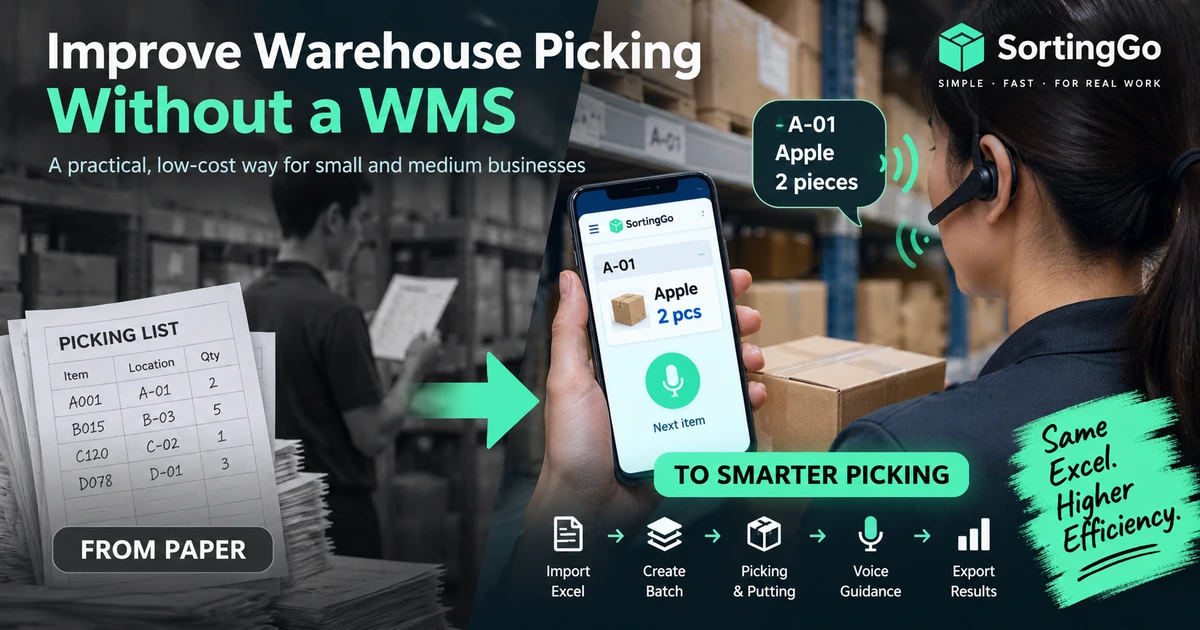
A warehouse management system (WMS) can provide powerful capabilities for inventory control, replenishment, traceability, multi-location operations, and system integration.
But does every small warehouse need to implement a full WMS before it can improve picking efficiency?
Not necessarily.
For many small businesses, wholesalers, e-commerce operations, food distributors, and local fulfillment teams, the immediate problem is much simpler:
Order data already exists in Excel, but warehouse workers still rely on printed picking lists to complete the work.
In this situation, improving warehouse picking does not have to begin with replacing every existing system.
A more practical first step is to improve how order data reaches the warehouse floor and how workers complete each picking task.
Why a full WMS may not be the first step
A WMS can be extremely valuable when warehouse operations require capabilities such as:
- real-time inventory management,
- replenishment rules,
- lot or serial number tracking,
- expiration-date management,
- multiple warehouse locations,
- complex user permissions,
- ERP integration,
- or large-scale multi-user coordination.
However, many smaller operations are not struggling with these problems yet.
Their daily workflow may still look like this:
Excel
  ↓
Print picking lists
  ↓
Walk through the warehouse with paper
  ↓
Check quantities manually
  ↓
Write notes or corrections
  ↓
Return to the office
  ↓
Update records again
The biggest inefficiency may not be the absence of a WMS.
It may simply be the gap between digital order data and paper-based warehouse execution.
If your warehouse is still deciding whether it is time to move away from printed picking lists, see our comparison of paper picking and digital picking.
Start by finding what actually slows picking down
Before introducing a new warehouse system, look at what workers actually do during picking.
Common problems include:
- repeatedly looking down at printed lists,
- searching for the next product or storage location,
- checking product names and quantities several times,
- working from an outdated printout after an Excel file has changed,
- manually rewriting exceptions or shortages,
- walking through the warehouse in an inefficient order,
- and re-entering results after picking is finished.
These are workflow problems.
And many of them can be improved without replacing the entire order-management process.
Step 1: Keep Excel if it already works
Excel is often treated as something that must be replaced before warehouse digitalization can begin.
That is not always necessary.
If your business already uses Excel to collect, prepare, or manage order data, Excel can continue to serve as the source of that information.
The more important question is:
Does the warehouse still need to print that data onto paper before work can begin?
Instead of:
Excel → Print → Paper → Picking
a lightweight digital workflow can become:
Excel → Mobile Device → Picking
This allows a business to improve warehouse execution without immediately redesigning its entire back-office process.
For a deeper look at this approach, see You Don't Need to Replace Excel. Replace Paper on the Picking Floor.
Step 2: Bring order data directly to the warehouse floor
Once order data can move from Excel or CSV directly to a mobile device, the picking process changes significantly.
Workers no longer need a printed list to know what comes next.
A simple workflow can look like this:
Excel / CSV
      ↓
Import Orders
      ↓
Create a Batch
      ↓
Start Picking
      ↓
Complete the Batch
The practical steps behind that first arrow are covered in our guide on how to turn an Excel order list into a picking workflow.
The goal is not to turn a smartphone into a smaller piece of paper.
The goal is to let the device actively guide the work.
A PDF displayed on a phone is still essentially a digital document. A digital picking workflow, on the other hand, can organize tasks, track progress, present the next item, and record completion as the work happens.
Step 3: Organize work into batches
Picking directly from a long order list can quickly become confusing.
Creating batches provides a clearer unit of work. A business might create one batch for today's morning deliveries, a group of customers, a shipping window, or a particular group of products.
Once orders are grouped into a batch, the warehouse can choose a workflow that matches the actual operation.
Two common approaches are Picking and Putting.
Picking
In Picking, the worker focuses on one customer or order and collects the required products for that customer.
Customer A
  ├─ Product 1
  ├─ Product 2
  └─ Product 3

Customer B
  ├─ Product 1
  └─ Product 4
Putting
In Putting, the worker focuses on one product and distributes it among multiple customers or destinations.
Product 1
  ├─ Customer A
  ├─ Customer B
  └─ Customer C

Product 2
  ├─ Customer A
  └─ Customer C
Putting can be useful for group buying, food distribution, wholesale operations, and other workflows where the same product needs to be distributed across many orders.
The important point is not that one method is always better. Digital workflows make it easier to organize the same order data according to how work is actually performed.
Step 4: Make the picking sequence match the warehouse
Replacing paper with a phone does not automatically make picking efficient.
Imagine an Excel file containing products in this order:
Product A
Product B
Product C
Product D
But the physical warehouse layout is:
A → D → B → C
If workers simply follow the Excel row order, they may still walk back and forth unnecessarily.
This is why picking sequence and routing matter.
A better digital workflow should allow the work sequence to reflect storage locations, shelf arrangement, product sequence, customer sequence, or a familiar route through the warehouse.
Let workers follow the warehouse, not the spreadsheet.
Step 5: Let workers focus on the products
Paper picking constantly competes for the worker's attention.
Look at paper
→ Find product
→ Look at paper again
→ Check quantity
→ Pick product
→ Mark paper
→ Find the next line
A mobile workflow can reduce some of these steps. Voice guidance can reduce them even further.
Storage location
→ Product
→ Quantity
→ Worker picks
→ Complete
→ Next instruction
Instead of repeatedly reading the screen, workers can receive spoken information while keeping more attention on the shelf, container, and product.
This is where voice picking becomes especially useful.
For more background, see What Is Voice Picking? A Practical Guide for Small Warehouses.
Step 6: Record progress digitally
Another weakness of paper-based picking appears after the physical work is finished.
If workers write corrections, shortages, or actual quantities on paper, someone may still need to enter that information into another system later.
That creates opportunities for duplicated work, missed changes, transcription errors, and delayed reporting.
A digital workflow can record progress while the work is happening:
Pending
  ↓
In Progress
  ↓
Completed
Actual picked quantities and exceptions can also be recorded directly during the task.
Already have your orders in Excel? See how SortingGo turns that file into a batch your team can work through on a phone.
Before and after: a lightweight digital picking workflow
Traditional paper workflow
Excel
  ↓
Print
  ↓
Paper Picking List
  ↓
Manual Picking
  ↓
Handwritten Corrections
  ↓
Manual Follow-Up
Lightweight digital workflow
Excel / CSV
      ↓
Mobile Import
      ↓
Create Batch
      ↓
Picking / Putting
      ↓
Voice-Guided Work
      ↓
Digital Completion Record
      ↓
Export Results
The business can keep the familiar Excel process while gradually improving warehouse execution.
What can be improved without a full WMS?
| Area | Paper-based approach | Lightweight digital approach |
|---|---|---|
| Order source | Excel | Excel / CSV |
| Warehouse instructions | Printed list | Mobile task list |
| Work organization | Manual | Batches |
| Picking method | Fixed by document | Picking or Putting |
| Work sequence | Spreadsheet order | Adjustable sequence |
| Product/location guidance | Read from paper | Screen + voice |
| Progress tracking | Pen marks | Digital status |
| Exceptions | Handwritten | Recorded during work |
| Results | Manual follow-up | Digital export |
This does not turn a lightweight picking tool into a WMS. It addresses a different layer of the problem: warehouse execution.
When should you consider a full WMS?
A full WMS becomes increasingly valuable when the business needs to manage:
- real-time inventory balances,
- receiving and put-away,
- replenishment,
- multiple warehouses,
- lot, batch, or serial number traceability,
- expiration dates,
- complex location management,
- sophisticated labor management,
- detailed role-based permissions,
- deep ERP integration,
- or large-scale real-time collaboration.
At that stage, warehouse operations are no longer only about guiding workers through picking tasks.
When is a lightweight approach enough?
A lightweight approach may be worth considering when your current situation sounds more like this:
We already have order data in Excel. We just want the warehouse floor to stop depending on printed picking lists.
Or:
We do not need a complete inventory management system yet. We need a better way to guide workers through today's orders.
In these situations, the first step does not have to be a large software implementation.
A lightweight example: SortingGo
SortingGo is designed around this type of workflow.
It is not intended to replace a full warehouse management system. Instead, it focuses on helping small teams move from order data to warehouse execution with fewer intermediate steps.
A typical SortingGo workflow can be:
Import Excel / CSV
        ↓
Create a Batch
        ↓
Choose Picking or Putting
        ↓
Follow Product / Customer Sequence
        ↓
Receive Voice Guidance
        ↓
Complete the Work
        ↓
Export Results
SortingGo is mobile-first, and its core picking and sorting work is designed to continue offline.
Depending on the workflow and subscription level, workers can use on-screen guidance, spoken prompts, headset button controls, and hands-free voice controls while handling products. The full list is on the SortingGo voice-guided picking features page.
The idea is simple:
Keep the tools that already work, and improve the part of the workflow that does not.
You do not have to digitalize everything at once
Warehouse digitalization does not have to be an all-or-nothing project.
Stage 1
Excel + Paper

        ↓

Stage 2
Excel + Mobile Picking

        ↓

Stage 3
Excel + Batches + Routing

        ↓

Stage 4
Excel + Voice-Guided Picking

        ↓

Stage 5
WMS / ERP Integration
when operational complexity requires it
Each stage solves a different problem, and a business can stop at the stage that matches its actual needs.
Final thoughts
A WMS can be an important investment, but it is not the only way to improve warehouse picking.
If your orders already live in Excel while your warehouse floor still depends on paper, there is a much smaller gap you can address first.
Start by asking:
- Can order data reach workers without printing?
- Can work be organized into clear batches?
- Can the sequence match the physical warehouse?
- Can workers receive instructions without repeatedly reading paper?
- Can completion and exceptions be recorded digitally?
For many small teams, the first step toward warehouse digitalization may not be a WMS.
It may simply be:
Keep Excel. Remove paper from the picking floor. Then improve one workflow at a time.
SortingGo is a mobile picking and sorting tool for small warehouses, e-commerce operations, group buying, food distribution, wholesale, and other teams that want to improve warehouse execution without starting with a complex WMS. Its workflow is built around practical operations such as Excel/CSV import, batch-based work, Picking, Putting, voice guidance, routing, and digital completion records.